
Summary: Last week Anthropic launched Claude Motion — animated videos from text, but only for paid Team and Enterprise users. Days later, the open-source team behind Open Design shipped their own free version: OpenDesign Motion. You type a prompt, it writes animation code, and you download an MP4. I dug into what it actually does and what it really costs.
So what just happened?
Quick backstory. On October 8, Anthropic gave Claude a new trick called Claude Motion. You describe a video — a product walkthrough, an animated chart — and it builds the animation. Cool tech. But it only works on Claude’s Team and Enterprise plans. Most of us? Locked out.
Then, about a week later, the open-source world did what it always does. The team behind Open Design dropped version 0.25.0, and the headline feature was OpenDesign Motion — their words, “the open-source alternative to Claude Motion.”
I checked the release notes on GitHub. This wasn’t a weekend hack: 53 code changes, 16 contributors, three weeks of work. And the app itself is free.
What does OpenDesign Motion actually do?
Forget video generators that dream up fake footage. This works differently — and honestly, that’s the smart part.
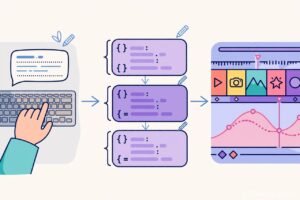
You type what you want. Say: “a 20-second promo for my client’s coffee shop.” The tool writes real code — HTML, CSS, JavaScript — that animates text, shapes, charts, and images across the screen. Then you can edit any of it. Change a word, swap a color, fix the timing. When you’re happy, export it as an MP4.
Because there’s no video-generation model involved, there are no fake people and no deepfakes. Everything on screen comes from your own words and images. What you see is what you asked for.
It also ships with five ready-made examples: Motion Future, Product Promo, Showreel, UI Morph, and Visual Lesson. Grab one, change the text, and you’ve got a working animated video in minutes. That’s a nice touch for anyone staring at a blank page.
The bit I like most: the source code stays yours. Claude Motion hands you a finished MP4. OpenDesign Motion gives you the MP4 plus the editable files. Interactive animations even stay as runnable web pages. Nothing hidden, nothing locked.
How you use it
It’s refreshingly simple:
First, open the Open Design app and find Motion Design on the Home or Community tab. Pick one of the five examples — or start from nothing and just describe your video.
Then pick a “motion skill” from the @ menu. These are pre-built skills that know how to build animations. The AI agent does the writing, running on whichever model you’ve connected (more on that in a minute).
Last step: tweak whatever you want in the editable source and export your MP4.
Fun detail: the team’s own launch video was made with DeepSeek V4.1 Flash — a cheap, fast model, not some monster flagship. You don’t need the most expensive AI to get decent results here.
OpenDesign Motion vs Claude Motion — the real differences
Same core idea, very different packages. Three things separate them:
Price. Claude Motion needs a paid Claude plan — Team or Enterprise. One reviewer put the Team plan at around $50 a month with a 2-seat minimum. OpenDesign Motion’s app costs nothing. You pay only for the AI model calls — and those can be free too (I’ll explain below).
Model choice. Claude Motion only runs on Anthropic’s models. OpenDesign Motion lets you bring almost anything: Claude Code, Codex, Cursor, Copilot, OpenCode, Qwen, or any OpenAI-compatible service. Even a free local model running on your own laptop through Ollama or LM Studio.
Ownership. With Claude Motion, you download an MP4. With OpenDesign Motion, you get the MP4 plus the full source code to keep editing later.
Now, one thing I want to be straight about: nobody has compared the two side by side yet. No independent reviewer has tested whether OpenDesign Motion’s output matches Claude Motion’s quality. So “alternative” is the team’s claim, not a proven fact. I’ll update this article when someone actually runs the comparison.
The money question: what does it really cost?
Okay, “free” needs unpacking. Here’s the honest breakdown:
- The app itself: free, open-source, Apache-2.0 license. Download for Mac or Windows from the GitHub releases page. Zero cost, forever.
- Trying it out: every new user gets roughly $0.50 in free credits on the hosted service. Enough for a first video or two.
- Go plan: $8 for your first month. That gets you models like DeepSeek V4.1 Flash, GLM-5.3 Flash, and MiMo 2.6 Flash. Bigger plans go up from there, with up to $200 in bonus credits.
- The truly free route: bring your own model. Already paying for Claude Code or Cursor? Use that as the engine. Or run a free local model on your laptop. Then the only thing you spend is time.
See the pattern? The software is free. The AI calls cost whatever your provider charges. Pick your own provider and you’re in control of the bill.

Why should freelancers and students care?
Let me put it in practical terms.
Say you’re a freelancer. Clients pay real money for product promos, explainer videos, animated ads. Your options today: learn a video editor (weeks of your life) or pay for a video tool every month. OpenDesign Motion gives you a third option — describe the video, get editable code, export MP4.
And here’s where it gets good for client work. A client says “change the price on slide 3.” Normally that’s a re-render, maybe an hour. With editable source code, you change one line of text. Done. That’s the kind of speed that lets one person punch above their weight.
For students, it’s even simpler. Course project? Club promo? Presentation opener? You can make animated videos that look professional without spending anything. Start from an example, swap in your words, export. Finished.
There’s also a bigger reason to pay attention. Open-source tools keep growing in public — anyone can read the code, report bugs, add features. Compare that with a tool locked inside one company’s paid plan. Different futures. I know which one I’d bet on long-term.
Want context on the tool it copies? We covered it here: Claude Adds Dashboards and Motion: Make Animated Videos and Live Reports. And if you’re hunting for more free stuff, our Best Free AI Tools for Students guide is worth a look.
A few honest warnings
It’s brand new. That means rough edges — the release notes themselves list fixes for previews, exports, and sign-in. Normal for a young project, but go in expecting the occasional hiccup.
Also: this isn’t magic. You still need a model connected — your own API key, a subscription you already pay for, or a local model. And your results depend on two things: which model you pick, and how clearly you describe what you want. Vague prompt, vague video.
My suggestion? Start with the free credits or the $0 local path. Test it on something small. If it clicks, you might just replace a paid animation tool. If it doesn’t — you spent nothing finding out.
What happens from here
Anthropic opened the door: animated videos from prompts, built from editable code instead of fake footage. OpenDesign Motion just walked through that door with a free, open version that works with any model you like.
And honestly, expect this to keep happening. Big AI company launches a locked-down creative tool — open-source team ships a free version weeks later. For creators, that’s the best possible news. Prices drop, features spread, tools reach more people.
I’ll update this post once someone properly compares OpenDesign Motion and Claude Motion head to head. Until then — the download costs nothing. Trying it costs nothing. That’s a pretty easy decision.
Source: Open Design v0.25.0 release notes (official GitHub release page): https://github.com/nexu-io/open-design/releases — cross-checked against independent coverage of the launch.